BatteryBar OSS
The open-source floating battery bar for Windows — a free successor to the discontinued BatteryBar Pro.
⭐ Found a bug or have an idea? Open an issue on GitHub — the full documentation lives in the repository.
Windows SmartScreen: the binaries are not code-signed yet, so
the first launch may show a blue "Windows protected your PC"
dialog — that's expected for a new unsigned exe, not malware.
Click More info → Run anyway.
Verified downloads come with a SHA256SUMS.txt so you can
check integrity (certutil -hashfile file.exe SHA256).
Proper signing via the SignPath Foundation program is on the
roadmap.
One bar, everything that matters
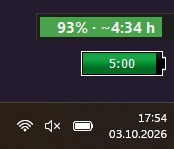 BatteryBar OSS — this project
BatteryBar Pro (original)
Windows 11 tray
BatteryBar OSS — this project
BatteryBar Pro (original)
Windows 11 tray
Emails, YouTube — or one last render?
Everyone knows it: your battery is dying and you get to choose — 10 more emails, 20 minutes of YouTube, or 5 minutes of rendering? The load view understands what your last 1, 5 and 15 minutes of system load looked like and shows exactly how much time you have left at each intensity — if you don't change a thing.
A continuously learning load→drain regression maps your usage to real watts — the estimates become yours, not generic.
Real remaining-time estimate
Fuel-gauge mWh/mW readings, session-average drain learning and a soft-reserve countdown — plausible seconds after unplugging.
Battery health
True design vs. full-charge capacity, wear %, cycle count and optional HP BIOS battery-mode readout.
Zero dependencies
Python standard library only at runtime; the release ships as a single portable exe or per-user installer — no admin rights.
Yours to shape
Drag, resize, click-through, hotkeys, JSON themes and a format-string display — plus self-updates from GitHub Releases.